
In today’s fast-paced world, events have become more sophisticated, and attendees expect seamless experiences. Technology plays a crucial role in delivering these experiences, and one device stands out for its versatility and user-friendliness: the iPad. Opting for ipad hire can significantly enhance your event, offering a range of benefits that contribute to a more engaging and efficient environment.
Whether you’re hosting a corporate conference, a trade show, or a training session, iPads can be tailored to meet your specific needs. The adaptability and functionality make them an ideal choice for a variety of applications. Let’s explore the key advantages of incorporating iPads into your next event.
Enhanced engagement and interactivity
iPads offer unparalleled opportunities to boost attendee engagement and interactivity. Forget static presentations; with iPads, you can create dynamic and immersive experiences that captivate your audience.
Interactive presentations
Transform traditional presentations into interactive experiences. Attendees can follow along on their iPads, access additional resources, participate in polls, and even ask questions in real-time. This level of engagement keeps them focused and involved, leading to better information retention.
Digital brochures and catalogues
Say goodbye to bulky printed materials. With iPads, you can provide attendees with digital brochures and catalogues that are easily accessible and environmentally friendly. These digital resources can be updated instantly, ensuring that everyone has the latest information at their fingertips. It also reduces waste, aligning with sustainable event practices.
Real-time feedback and polling
Gather valuable feedback from your attendees in real-time. Use iPads to conduct polls, surveys, and Q&A sessions. This allows you to gauge audience understanding, identify areas for improvement, and tailor your event content accordingly. The immediate feedback loop enables you to make adjustments on the fly, ensuring that your event remains relevant and engaging.
Streamlined event management
Beyond enhancing attendee engagement, iPads can also streamline various aspects of event management. From registration to data collection, these devices can help you optimise processes and improve efficiency.
Efficient registration process
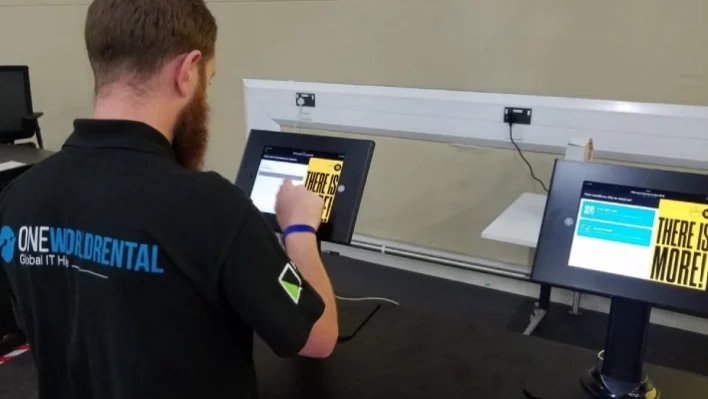
Speed up the registration process with iPad-based check-in systems. Attendees can quickly register using self-service kiosks or assisted check-in stations. This eliminates long queues and reduces waiting times, creating a positive first impression. The data collected during registration can also be used to personalise the event experience.
Data collection and analytics
Gather valuable data about attendee behaviour and preferences. Use iPads to track session attendance, collect feedback, and monitor engagement levels. This data can be analysed to gain insights into what works well and what needs improvement, helping you to plan more successful events in the future.
Paperless event experience
Reduce your environmental footprint by creating a paperless event. Distribute event schedules, maps, and other essential information digitally via iPads. This eliminates the need for printed materials, saving you money and reducing waste. It also aligns with corporate social responsibility goals, demonstrating your commitment to sustainability.
Cost-effectiveness and flexibility
While the initial investment in iPads may seem significant, choosing ipad rentals offers a cost-effective and flexible solution for your event needs.
Reduced equipment costs
Instead of purchasing iPads outright, consider renting them for your event. This eliminates the need for a large upfront investment and reduces the risk of obsolescence. You can rent the exact number of devices you need for each event, avoiding unnecessary expenses.
Scalability and customisation
Easily scale your iPad deployment to meet the specific requirements of each event. Whether you need a few dozen devices for a small workshop or hundreds for a large conference, you can adjust your rental order accordingly. You can also customise the iPads with your branding, event apps, and security settings.
Technical support and maintenance
When you rent iPads, you typically receive technical support and maintenance services as part of the package. This ensures that your devices are always in optimal working condition and that any technical issues are resolved quickly. This can save you time and resources, allowing you to focus on other aspects of event management.
Versatility and functionality
iPads are incredibly versatile devices that can be used for a wide range of applications. Their functionality extends far beyond basic tasks, making them an invaluable tool for event organisers.
Presentation and display
Use iPads to display presentations, videos, and other visual content. Connect them to projectors or large screens for impactful presentations. The high-resolution displays and powerful processors ensure that your content looks its best.
Interactive kiosks and information points
Set up interactive kiosks and information points using iPads. Attendees can use these kiosks to access event schedules, maps, speaker bios, and other essential information. This provides a self-service option that reduces the need for staff assistance and improves the overall attendee experience.
Note-taking and collaboration
Encourage attendees to take notes and collaborate using iPads. With apps like Notes and Google Docs, they can easily capture ideas, share documents, and work together on projects. This fosters a more collaborative and productive learning environment.
Security and data protection
Security is a top priority for event organisers. iPads offer a range of security features that help protect sensitive data and prevent unauthorised access.
Password protection and encryption
Protect your iPads with strong passwords and encryption. This prevents unauthorised access to sensitive data and ensures that your devices are secure. You can also use mobile device management (MDM) software to remotely lock or wipe devices if they are lost or stolen.
Remote device management
Use MDM software to remotely manage and control your iPads. This allows you to install apps, configure settings, and monitor device usage from a central location. You can also use MDM to enforce security policies and ensure that all devices are compliant with your organisation’s standards.
Data wiping and sanitisation
Before returning rented iPads, ensure that all data is securely wiped and sanitised. This prevents sensitive information from falling into the wrong hands and protects your organisation’s privacy. Reputable rental companies typically offer data wiping services as part of their standard procedures.
Real-world examples of iPad integration at events
To illustrate the benefits of using iPads at events, let’s look at some real-world examples.
Trade shows
At trade shows, exhibitors can use iPads to showcase their products and services, collect leads, and conduct product demonstrations. Attendees can use iPads to navigate the show floor, access exhibitor information, and participate in interactive games and contests. This creates a more engaging and interactive experience for both exhibitors and attendees.
Corporate conferences
At corporate conferences, speakers can use iPads to deliver interactive presentations, conduct polls, and answer questions from the audience. Attendees can use iPads to take notes, access presentation slides, and network with other attendees. This fosters a more collaborative and productive learning environment.
Training sessions
During training sessions, instructors can use iPads to deliver interactive lessons, administer quizzes, and provide feedback to students. Students can use iPads to take notes, complete assignments, and collaborate with their peers. This creates a more engaging and effective learning experience.
Conclusion: elevate your event with iPad hire
Incorporating iPads into your events can significantly enhance the attendee experience, streamline event management, and improve overall efficiency. From interactive presentations to efficient registration processes, iPads offer a range of benefits that can help you create more engaging and successful events. By opting for ipad rentals, you can enjoy these advantages without the burden of a large upfront investment. So, consider leveraging the power of iPads to unlock seamless events and create memorable experiences for your attendees. You can get the best ipad rentals right here.
Frequently asked questions about iPad hire
Here are some frequently asked questions about using iPads at events:
What types of events are best suited for iPad integration?
iPads can be used effectively at a wide range of events, including corporate conferences, trade shows, training sessions, product launches, and fundraising galas. Their versatility makes them a valuable tool for any event that requires attendee engagement, data collection, or streamlined management.
How many iPads do I need for my event?
The number of iPads you need will depend on the size of your event and the specific applications you plan to use them for. Consider factors such as the number of attendees, the number of sessions, and the availability of Wi-Fi. It’s always a good idea to overestimate slightly to ensure that you have enough devices to meet your needs.
What types of apps should I install on the iPads?
The apps you install on the iPads will depend on the specific goals of your event. Some popular apps for events include presentation software, survey tools, note-taking apps, and social media platforms. You may also want to consider installing custom event apps that provide attendees with information about the schedule, speakers, and sponsors.
How do I ensure the security of the iPads at my event?
To ensure the security of the iPads at your event, you should implement a range of security measures, including password protection, encryption, remote device management, and data wiping. You should also educate your staff and attendees about security best practices, such as avoiding suspicious links and keeping their devices locked when not in use.
What happens if an iPad is lost or damaged during the event?
Before the event, it’s essential to have a plan in place for dealing with lost or damaged iPads. You should clearly outline the responsibilities of attendees and staff in the event of a loss or damage. You should also have insurance coverage that protects you against financial losses resulting from lost or damaged devices. When you rent iPads, the rental company will usually have its own policies regarding loss or damage.
